
Email automation workflow templates save hours and drive consistent revenue on autopilot. Automated email workflows generate 320% more revenue than batch-and-blast campaigns. Yet most businesses still rely on manual sends.
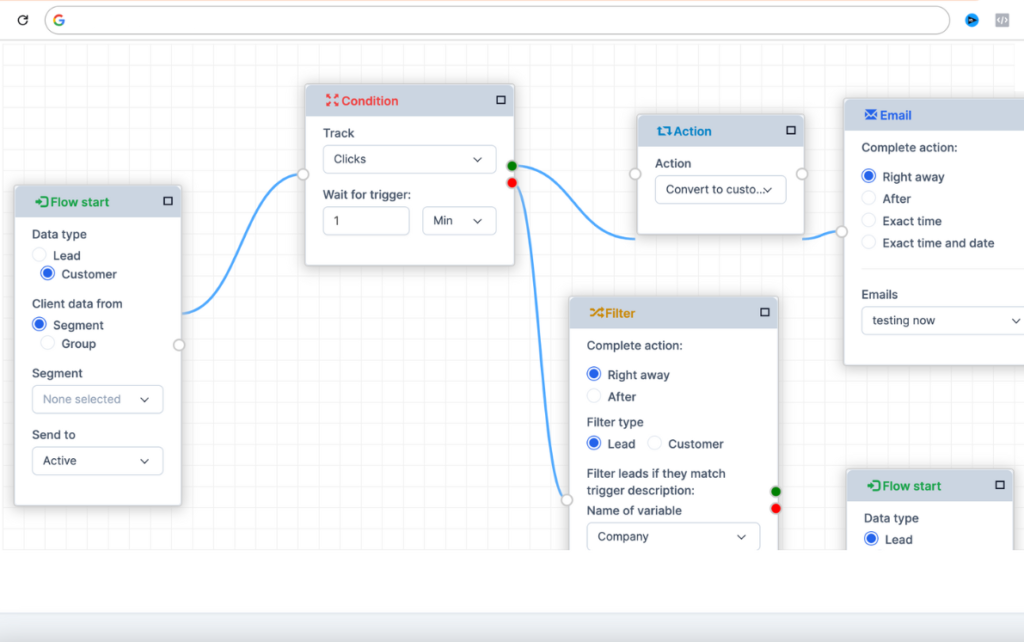
Why? Because building automation workflows feels complicated. It doesn’t have to be.
In this guide, you’ll get 10 ready-to-use email automation workflow templates — complete with triggers, timing, and email content suggestions. Copy them. Customize them. Launch them. Start generating revenue while you sleep.
Why Email Automation Workflow Templates Outperform Manual Campaigns — Workflows Guide
Before we dive into the templates, let’s look at the data:
| Metric | Manual Campaigns | Automated Workflows |
| Open rate | 21.3% | 42.6% |
| Click-through rate | 2.6% | 8.2% |
| Conversion rate | 1.2% | 4.5% |
| Revenue per email | $0.07 | $0.26 |
Source: DMA Marketer Email Tracker, GetResponse Email Marketing Benchmarks
The difference is simple: automated emails arrive when the subscriber is most interested — right after they take an action that signals intent.
Workflow Template #1: The 5-Email Welcome Sequence
Best for: Every business. This is your highest-ROI workflow.
Trigger: New subscriber joins your list
| Step | Timing | Email Type | Content |
| 1 | Immediately | Welcome + delivery | Thank them for subscribing. Deliver your lead magnet (ebook, discount, checklist). Set expectations for future emails. |
| 2 | Day 2 | Value-add content | Share your most popular blog post, video, or resource. No pitch — pure value. |
| 3 | Day 4 | Story + social proof | Share your brand story or a customer success story. Make it personal. |
| 4 | Day 7 | Soft pitch | Introduce your product or service naturally. Focus on the problem it solves. |
| 5 | Day 10 | Best offer | Your strongest call-to-action. Free trial, consultation, or limited-time discount. |
Key metric: Email #1 open rate (benchmark: 60-86%)
Pro tip: If a subscriber clicks your offer link in email #4, skip email #5 and move them directly to a sales nurture sequence. Don’t send offers to people who already converted.
Workflow Template #2: Lead Magnet Delivery + Nurture
Best for: Businesses using content upgrades (ebooks, checklists, templates, webinars)
Trigger: Subscriber downloads a specific lead magnet
| Step | Timing | Email Type | Content |
| 1 | Immediately | Lead magnet delivery | “Here’s your download link.” Include quick-start instructions. |
| 2 | Day 1 | Related resource | A blog post or video that goes deeper on the same topic. |
| 3 | Day 3 | Case study | How someone used the information from the lead magnet to achieve a result. |
| 4 | Day 5 | Problem-aware content | “Now that you understand X, here’s the challenge most people face with Y.” |
| 5 | Day 7 | Solution offer | Introduce your product as the natural next step. |
Key metric: Click-through rate on emails 2-4 (benchmark: 5-10%)
Segmentation tip: Tag subscribers based on which lead magnet they downloaded. Different lead magnets → different nurture sequences.
Workflow Template #3: Abandoned Cart Recovery (3-Step)
Best for: E-commerce stores, SaaS free trials, digital product sellers
Trigger: User adds item to cart but doesn’t complete checkout (via webhook from Shopify, WooCommerce, or payment platform)
| Step | Timing | Email Type | Content |
| 1 | 1 hour | Gentle reminder | “You left something in your cart.” Show the product image. Make checkout easy with a direct link. |
| 2 | 24 hours | Social proof | Customer reviews and testimonials for the abandoned product. “Here’s why people love this.” |
| 3 | 48 hours | Urgency + incentive | “Last chance.” Add free shipping, a small discount, or a limited-time bonus. |
Key metric: Recovery rate (benchmark: 10-15% of abandoned carts recovered)
Data point: The average abandoned cart rate is 70%. Recovering just 10% can double your revenue.
Workflow Template #4: Post-Purchase Retention
Best for: E-commerce, subscription businesses, SaaS
Trigger: Customer completes a purchase
| Step | Timing | Email Type | Content |
| 1 | Immediately | Order confirmation | Receipt, order details, what to expect next. |
| 2 | Day 3 | Usage tips | “Getting the most out of your purchase.” Tips, guides, or setup instructions. |
| 3 | Day 10 | Check-in | “How’s it going?” Ask for feedback. Offer help if needed. |
| 4 | Day 21 | Cross-sell | Recommend a complementary product based on their purchase. |
| 5 | Day 45 | Reorder reminder | For consumable products: “Time to restock?” |
Key metric: Repeat purchase rate (benchmark: 20-30% for e-commerce)
Why it matters: Acquiring a new customer costs 5-7x more than retaining an existing one. Post-purchase workflows pay for themselves.
Workflow Template #5: Re-Engagement & List Cleaning
Best for: Every business that sends regular emails
Trigger: Subscriber hasn’t opened any email in 60 days
| Step | Timing | Email Type | Content |
| 1 | Day 60 | “We miss you” | Acknowledge the silence. Share your best recent content. Make it easy to re-engage (one-click “I’m still interested”). |
| 2 | Day 67 | Best offer | Your most compelling piece of content or strongest offer. “In case you missed it.” |
| 3 | Day 75 | Final decision | “We don’t want to clutter your inbox.” Clear options: click to stay subscribed, or we’ll remove you. |
| 4 | Day 82 | Auto-clean | If no engagement, automatically unsubscribe or suppress from future sends. |
Key metric: Reactivation rate (benchmark: 5-15%)
Critical: Keeping inactive subscribers on your list damages your sender reputation. ISPs track engagement. Low engagement = more emails landing in spam. Clean your list quarterly.
Workflow Template #6: Webinar Registration & Follow-Up
Best for: B2B, SaaS, coaching, and consulting businesses
Trigger: Someone registers for your webinar or live event
| Step | Timing | Email Type | Content |
| 1 | Immediately | Confirmation | “You’re registered!” Calendar link, event details, what they’ll learn. |
| 2 | 24 hours before | Value teaser | Share a surprising stat or insight they’ll get at the webinar. Build anticipation. |
| 3 | 1 hour before | Last call | “Starting soon.” Direct join link. Quick tech check reminder. |
| 4 | 1 hour after | Recording (attendees) | “Thanks for joining.” Recording link, slides, and next steps. |
| 5 | 1 hour after | “You missed it” (no-shows) | “We missed you.” Recording link. Tease what they missed. |
| 6 | Day 2 | Offer | Limited-time offer for both attendees and no-shows. |
Key metric: Registration-to-attendance rate (benchmark: 35-45%)
Data point: Webinar attendees who receive follow-up emails are 3x more likely to purchase than those who don’t.
Workflow Template #7: Lead Scoring & Sales Handoff
Best for: B2B companies with a sales team
Trigger: Lead accumulates a certain lead score (based on email opens, link clicks, page visits, form fills)
| Step | Timing | Email Type | Content |
| 1 | Score ≥ 50 | “You seem interested” | Acknowledge their engagement. Offer a case study or ROI calculator. |
| 2 | Score ≥ 75 | “Ready for a conversation?” | Direct CTA: book a call, request a demo, start a free trial. |
| 3 | Score ≥ 90 | Sales handoff | Internal notification to sales team. Stop automated emails. Sales takes over. |
Key metric: Marketing Qualified Lead (MQL) to Sales Qualified Lead (SQL) conversion rate
How to score leads:
- Email open: +5 points
- Link click: +15 points
- Pricing page visit: +30 points
- Demo request: +50 points
- Multiple visits in one week: +20 points
Workflow Template #8: Free Trial Onboarding
Best for: SaaS businesses
Trigger: User starts a free trial
| Step | Timing | Email Type | Content |
| 1 | Immediately | Welcome + setup | “Here’s how to get started in 5 minutes.” Link to setup guide or quickstart video. |
| 2 | Day 1 | Key feature highlight | Focus on the ONE feature that delivers the most value fastest. |
| 3 | Day 3 | Success story | How a similar company achieved results using your product. |
| 4 | Day 5 | Advanced tip | A power-user technique most new users miss. |
| 5 | Day 7 | Mid-trial check-in | “How’s it going?” Usage-based suggestions. If they’re active, encourage deeper use. If inactive, offer help. |
| 6 | Day 10 | Upgrade offer | “Your trial ends in 4 days.” Highlight what they’ll lose on the free plan. |
| 7 | Day 13 | Last chance | Final upgrade reminder. Include testimonials and money-back guarantee. |
Key metric: Free trial to paid conversion rate (benchmark: 15-25% for B2B SaaS)
Workflow Template #9: Survey & Feedback Collection
Best for: Any business wanting customer insights
Trigger: Customer reaches a milestone (30 days post-purchase, completed onboarding, attended an event)
| Step | Timing | Email Type | Content |
| 1 | Milestone reached | Feedback request | Short survey (3-5 questions max). Offer an incentive (discount, entry to prize draw). |
| 2 | Day 3 (if no response) | Reminder | “We’d love your feedback.” Keep it friendly and low-pressure. |
| 3 | Day 7 (if no response) | Final ask | “Last chance to share your thoughts.” Accept that most won’t respond — 20-30% is normal. |
Key metric: Survey completion rate (benchmark: 10-30%)
How to use the data:
- Positive feedback → Ask for a testimonial or review
- Neutral feedback → Identify areas for improvement
- Negative feedback → Trigger a support follow-up
Workflow Template #10: Birthday & Anniversary Campaigns
Best for: B2C businesses, e-commerce, restaurants, hospitality
Trigger: Contact’s date-of-birth (DOB) field matches today’s date
| Step | Timing | Email Type | Content |
| 1 | 8:00 AM (local time) | Birthday greeting | “Happy birthday, [Name]! 🎂” A warm, personal message. Include a special gift or discount. |
| 2 | Day 3 | Expiry reminder | “Your birthday gift expires tomorrow.” Create urgency without being pushy. |
Key metric: Redemption rate of birthday offer (benchmark: 10-20%)
Pro tip: Use time logic to send birthday emails at 8:00 AM in the subscriber’s local time zone — not your time zone. An email at midnight feels like spam; an email with morning coffee feels thoughtful.
How to Implement These Workflows
You don’t need all ten workflows on day one. Here’s the priority order:
- Welcome sequence (highest ROI, lowest complexity) — Launch this week
- Abandoned cart recovery (if e-commerce) — Launch this week
- Lead magnet delivery (if content marketing) — Launch this week
- Re-engagement (protect your deliverability) — Launch within 2 weeks
- Post-purchase follow-up (increase retention) — Launch within 2 weeks
- Everything else — Launch within 30 days
What You Need to Get Started
- An email marketing platform with visual automation builder — Look for drag-and-drop workflow creation, not form-based rules
- At least 3-5 email templates — Welcome, nurture, promotional, re-engagement
- Lead magnet or value-add content — Something worth subscribing for
- 30 minutes per workflow — That’s all it takes with a visual builder
5 Common Workflow Mistakes to Avoid
1. Sending Too Many Emails Too Fast
A welcome sequence with 3 emails in 24 hours feels like spam. Space them out. Week 1: 2-3 emails. Week 2+: 1-2 per week.
2. Not Testing All Branches
If your workflow has a YES/NO branch, test BOTH paths. The NO path is where most bugs hide — because we mentally design for the happy path.
3. Forgetting to Exclude Existing Customers
Nothing says “we don’t know you” like sending a “buy our product” email to someone who already bought. Always add exclusion rules.
4. Setting It and Forgetting It
Automation is not “set and forget.” Review performance monthly. Check: Are open rates declining? Is a specific step losing people? Tweak and optimize.
5. Not Using Personalization
“Hi there” is dead. Use dynamic tags: [First Name], [Company], [Product Purchased]. Personalized subject lines increase open rates by 26%.
Start Building Your First Workflow Today
Email automation isn’t just for enterprise marketing teams. A solo business owner can set up a 5-email welcome sequence in under 30 minutes with a visual automation builder.
Here’s your action plan for today:
- Choose ONE workflow from the list above (start with Welcome)
- Write the emails (or use templates)
- Build the workflow in your automation platform
- Test it with your own email address
- Activate it
One workflow, built today, will generate leads and revenue for months — completely on autopilot.
_Ready to build your first email automation workflow? Start your free trial with ClickSuccess and launch your welcome sequence today._
Discover more templates at ActiveCampaign’s workflow guide.


 English
 Vietnamese